
The crypto POS system that settles in seconds, not days
Charge in your local currency, get paid in USDC or USDT on a fast network, and watch the money land in a wallet only you control — before the customer has put their phone away.
Non-custodial · No card network · No chargebacks · Any phone is a terminal
Key takeaways
- Speed is a network choice. Solana confirms in roughly 0.4s and Base in about 2s; Bitcoin can take 10–60 minutes. At a register that difference is the whole product.
- No hardware to buy. A terminal is a record in your dashboard — any phone, tablet or laptop with a browser becomes a till.
- Every cashier is accountable. A 4–6 digit PIN per cashier, a revocable link, and sales attributed per person and per terminal.
- Prices stay in your currency. The cashier types 10.00 USD, PEN, EUR or MXN; Payzum converts to the chosen coin at the moment the charge is created.
- The money is yours on arrival. Non-custodial settlement to your own wallet — no payout schedule, no acquirer holding a balance, no reversals.
At a counter, confirmation time is the product
Online, a customer will happily wait a minute for a payment to confirm. At a till with three people queuing behind them, a minute is an eternity. That is why a crypto POS system lives or dies on which networks it puts in front of the cashier.
Approximate typical confirmation times on each network. Payzum also supports Bitcoin and Ethereum, but a busy register should stay on the fast lanes — which is exactly why the terminal lets you choose, per till, which networks a cashier is allowed to offer.
Fast on-chain beats fast-looking cards
A card tap feels instant because the terminal prints a receipt on the strength of an authorisation — a promise, not a payment. The money itself arrives one to three business days later, minus fees, and can be pulled back for months afterwards. A stablecoin payment inverts that: the confirmation you see on screen is the settlement, and it is final.
Give slow chains more room, or don't offer them
Every POS charge carries an expiry — 15 minutes by default, adjustable when you know the customer is paying on a slower network. If you would rather not think about it at all, leave the fast networks as the only ones the terminal accepts and the question never reaches your cashier.
Not sure which networks fit your customers?
Tell us where you sell and what your average ticket looks like, and we will map the networks and coins worth enabling at your counter — including whether stablecoins-only is the right default for you.
No commitment · We will tell you if crypto is a bad fit for your business
What a card terminal really costs a small business
The advertised percentage is rarely the whole bill. A local business running card payments typically carries terminal rental, a settlement delay measured in business days, a rolling reserve if the acquirer considers the category risky, and the standing possibility that a completed sale is reversed weeks later through a chargeback — with a fee attached whether or not the merchant wins.
None of that is anyone's fault in particular. It is the structure: a card payment is a pull from the customer's account, authorised now and settled later by a chain of intermediaries who each hold the money briefly and each price the risk of the ones after them. The merchant sits at the end of that chain.
The cost of leaving it alone
For a business with thin margins, a settlement delay is working capital you have already spent but cannot use. For a business in a category acquirers dislike, an account review can stop takings entirely with no warning. And for a market stall or a taxi, the terminal itself is a piece of hardware to charge, carry, insure and eventually replace.
How the Payzum crypto POS works
Five pieces, all configured from one dashboard: terminals, cashiers, the charge screen, the sales ledger, and the stablecoin guardrails that keep a volatile coin from becoming your problem.
One terminal per till — no hardware to buy
A terminal is a record, not a device: give it a label like Caja 1 and an optional location code like store-lima-01, and any browser can act as that till. Each terminal carries its own rules — which fiat currencies it can price in, which networks and tokens it accepts, and a default pricing mode.
- Run several tills, stalls or vehicles from one account
- Location codes keep multi-store reporting clean
- Restrict a busy counter to fast networks only

A fresh QR for every single sale
The cashier picks the terminal, types the amount in your local currency, and Payzum converts to the chosen coin at that moment. A new QR is generated per transaction — never a static address on a laminated card — with an optional order reference and description so the sale reconciles later. The customer scans, pays, and the cashier watches it confirm.
- Price in USD, EUR, PEN, MXN and dozens more
- Expiry per charge — extend it on slower networks
- Reference and description travel with the payment

A PIN per cashier, revocable in one click
Each cashier gets their own link and a 4–6 digit PIN they enter before they can charge anything. Assign them to one terminal or several. If a phone is lost or someone leaves, rotate the link from their page and the old one stops working immediately — no password reset across the team, no shared login nobody wants to change.
- The PIN is the session credential, not a shared secret
- Rotate a link to revoke a device instantly
- Every sale stays attributed to the person who took it

Close the day by cashier and by terminal
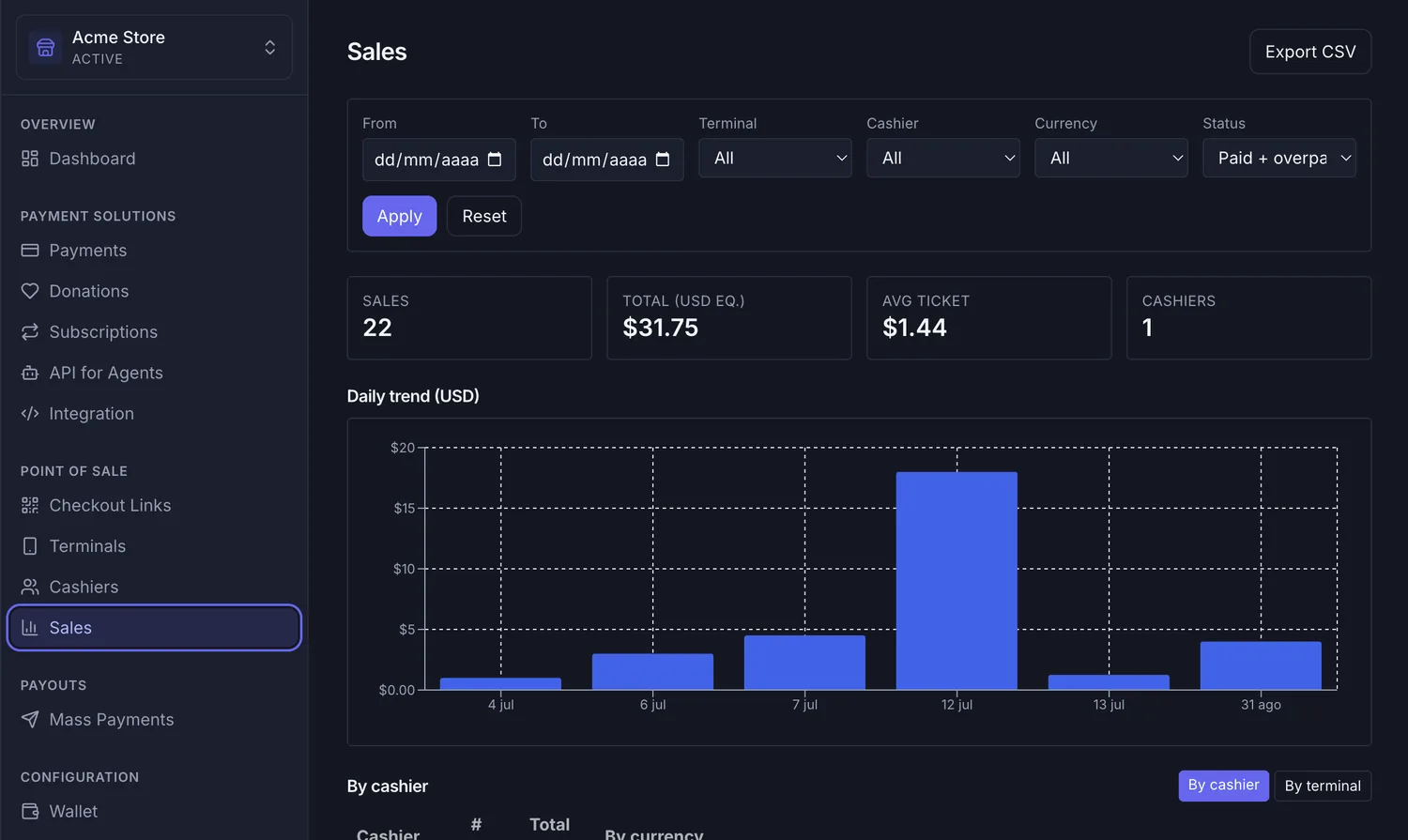
The sales screen gives you the numbers a manager actually asks for: how many sales, total in USD equivalent, average ticket, how many cashiers were active, and the daily trend. Filter by date range, terminal, cashier, currency or status, switch the breakdown between cashier and terminal, and export a CSV for your accountant.
- Per-cashier and per-terminal breakdowns
- CSV export for offline analysis
- USD equivalents use the rate at settlement time
Stablecoin guardrails, set once
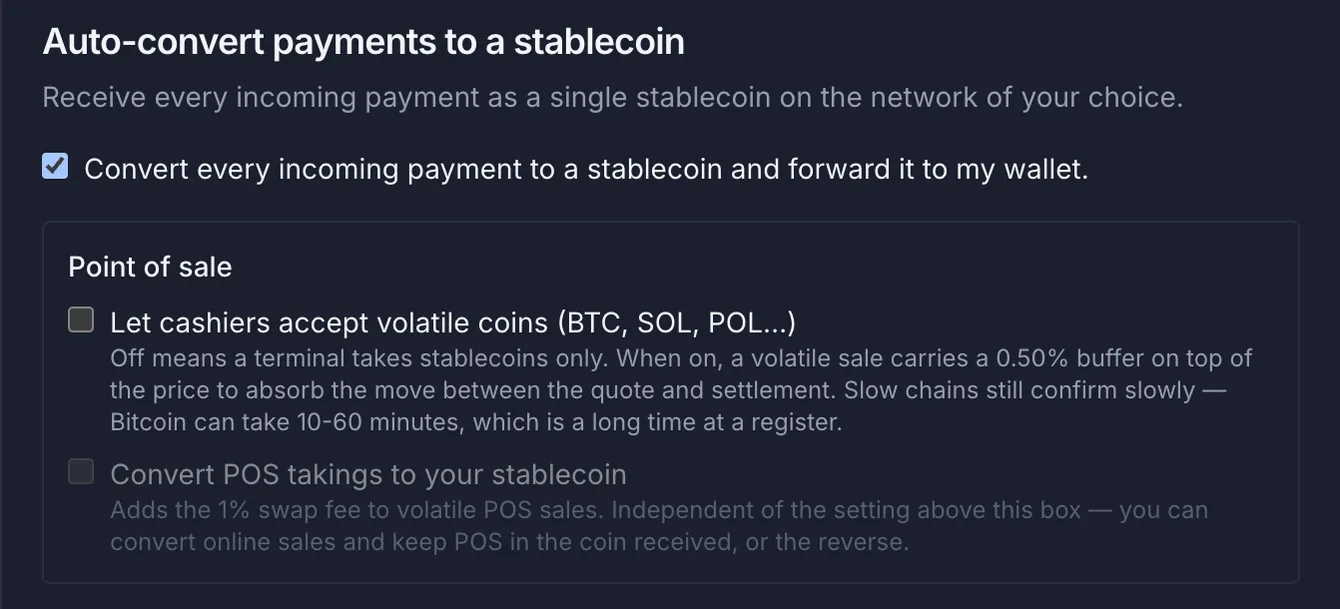
Leave volatile coins off and a terminal simply takes stablecoins — nothing to hedge, nothing to explain to a cashier. Turn them on and a volatile sale carries a small buffer on top of the price to absorb the move between quote and settlement. Separately, you can auto-convert takings to the stablecoin and network of your choice and forward them straight to your wallet.
- Stablecoins-only is one checkbox away
- Online and in-store settings are independent
- Auto-conversion stays on-chain — Payzum never touches fiat
Live at the counter in four steps
No integration, no engineer, no hardware order. If you can add a user to a spreadsheet, you can set this up.
Point it at your wallet
Create your merchant account and set the wallet addresses that should receive the money. Payzum never holds it — the address you enter is where sales land.
Create a terminal
Name it after the till or the stall, add a location code if you run more than one site, and choose the fiat currencies and networks it may accept.
Add your cashiers
One record per person, each with a 4–6 digit PIN, assigned to the terminals they work on. Send each of them their link.
Take the first sale
The cashier opens the link, enters their PIN, types the amount, shows the QR. The customer scans and pays; you both watch it confirm.
Want us to set it up with you?
We will walk your counter through it on a call — terminals, cashiers, the networks worth enabling for your customers, and how the day-end numbers should look.
What this looks like in a real business
The pattern is always the same — a queue, a phone, a QR — but the reason it wins is different in each place.
Two tills, four servers, one closing report
Each till is a terminal and each server a cashier with their own PIN. At close, the manager filters the day by terminal, checks the per-cashier breakdown against the drawer, and exports a CSV. Tips and card fees stop being a reconciliation puzzle because there are no card fees.
No signal for a card reader, no problem
A weekend stall does not justify renting a terminal for two days a month. The stallholder opens the cashier link on their own phone, charges in local currency, and packs up at the end of the day with the takings already settled in their wallet — nothing to bank on Monday.
One driver, one terminal, paid on arrival
Give each vehicle its own terminal and each driver their own PIN. The fare is charged in the local currency at the door, confirms on a fast network before the passenger has stepped out, and lands directly in the operator's wallet instead of a weekly settlement run.
Per-chair takings without a per-chair terminal
Independent stylists renting a chair each become their own cashier. The salon sees the total, each stylist sees their own sales, and nobody argues about the end-of-week split because the ledger already attributes every sale to the person who took it.
Small tickets that survive the fee
A basket of a few dollars is where card fees hurt most. Charging in a stablecoin on a low-cost fast network keeps the economics of a small basket intact — and there is no monthly minimum to hit for the privilege.
Stand up a counter for three days
A festival bar spins up terminals per counter and cashiers per shift on the morning of day one, then rotates every link on the way home. No hardware to hire, no deposit, and no acquirer deciding an event trader is too risky halfway through the weekend.
Payzum POS vs a card terminal vs a custodial crypto processor
The distinction that matters is not crypto versus cards — it is who holds your money between the sale and your bank.
| At the counter | Payzum POS | Card terminal | Custodial crypto processor |
|---|---|---|---|
| When you get the money | Seconds — the confirmation is the settlement | 1–3 business days | On the provider's payout schedule |
| Who holds it in between | Nobody — it goes to your wallet | Acquirer and processor | The processor |
| Chargebacks | None — payments are final | Reversible for up to ~120 days | None on-chain, but the balance can be frozen |
| Hardware | Any phone, tablet or laptop | Rented or bought terminal per till | Varies |
| Adding a cashier | A record and a PIN, in seconds | A new device or a shared login | Varies |
| Volatility | None if you take stablecoins; optional auto-convert | Not applicable | Usually handled, at the cost of custody |
| Account freeze risk | No balance to freeze | Reserves and reviews are standard | The provider controls the balance |
The objections we hear most
"My customers don't pay in crypto."
Most won't, and that is fine — this is an additional rail, not a replacement for the one you have. It earns its place with the customers who do: tourists, remote workers paid in stablecoins, and anyone whose card is a nuisance to use where you trade.
"I don't want to hold a volatile asset."
Then don't. Leave volatile coins switched off and the terminal takes USDC and USDT only, which track the dollar. You can also auto-convert anything that arrives into the stablecoin and network you picked.
"Is my money safe if Payzum has a bad day?"
Your takings never sit with us. Payments go to a wallet you control, so there is no Payzum balance to lose access to — the worst case is that you go back to your other payment method until we are back.
"What about refunds without chargebacks?"
A refund becomes a deliberate transfer you make from your own wallet, on your own terms, rather than a dispute an issuer decides months later. That is more work in the rare case and far less exposure in the common one.
Crypto POS: frequently asked questions
What is a crypto POS system?
A crypto POS system is the till-side software that turns a sale into an on-chain payment. The cashier enters the amount in the local currency, the system shows a QR code for that specific sale, and the customer pays from their wallet app. With Payzum the payment settles directly to the merchant's own wallet — there is no acquirer holding the money in between.
Do I need to buy a card terminal or special hardware?
No. A Payzum terminal is a record in your dashboard, not a device. Any phone, tablet or laptop with a browser can act as a till: the cashier opens their link, enters a PIN, types the amount and shows the QR. You can run one terminal or dozens across several locations from a single account.
How fast does a crypto POS payment confirm?
It depends entirely on the network. On Solana confirmation is around 0.4 seconds, on Arbitrum around 0.3 seconds, on Avalanche around 1 second, on BNB Chain around 1.5 seconds, and on Base and Polygon around 2 seconds. Bitcoin, by contrast, can take 10 to 60 minutes — which is why a counter should stay on the fast networks.
What happens if the crypto price moves between the quote and the payment?
If the terminal only accepts stablecoins there is nothing to move: USDC and USDT track the dollar. If you let cashiers accept volatile coins, a volatile sale carries a small buffer on top of the price to absorb the move between the quote and settlement. You can also turn on auto-conversion so every payment arrives as the stablecoin you chose.
Can a customer charge back a crypto POS sale?
No. An on-chain payment is pushed by the customer and is final once confirmed. There is no issuing bank that can pull the money back months later, so the chargeback category — and the fees and paperwork that come with it — does not exist. The trade-off is that refunds are a deliberate action you make, not a dispute someone files.
How do I stop a cashier from taking payments after they leave?
Every cashier has their own link plus a 4–6 digit PIN, and each link can be rotated from the cashier's page in the dashboard. Rotating it stops the old link working immediately, so a lost phone or a departing employee is a ten-second fix. Sales stay attributed to the cashier who took them.
Does the money go through Payzum first?
No. Payzum is non-custodial: the customer pays into a wallet you control and Payzum never holds, pools or moves your takings. There is no payout schedule to wait for and no balance for anyone to freeze, because settlement and payment are the same event.
Let's look at your counter together
Twenty minutes, your actual setup: how many tills, how many people on them, which networks your customers would realistically use, and what your day-end reconciliation should look like. If a crypto POS is the wrong tool for your business, we will say so.
Non-custodial · Crypto-only · Funds settle to wallets you control
More on accepting crypto in person: the POS overview on our homepage, the networks we support, guides by business type on the blog, and the POS & cashiers documentation.