
Crypto payment integration, in three steps
One call from your server, one line in your page. No wallet infrastructure to stand up, because the money settles straight to addresses you already control.
REST API · No SDK required · Redirect, modal or inline · Signed webhooks
Key takeaways
- Three required fields.
price_amount,price_currencyandpay_currency. Everything else is optional. - Let the buyer choose. Send
pay_currency: "all"and the checkout shows a searchable selector, limited to the tokens you allow. - Three surfaces, one checkout. Redirect, modal overlay or inline embed — the same hosted page underneath.
- The webhook is the truth. Widget callbacks move the buyer along; the signed IPN releases the goods.
- 29 platform integrations. WooCommerce, PrestaShop, Magento 2, Shopify, OpenCart, Shopware 6, WHMCS and more — eight already public, the rest available on request.
Build the request, read the response, render the checkout
The dashboard ships an integration playground that walks these exact three steps against your real account, so you can see the response before you write a line of code.
Your server creates the payment
A single authenticated POST. price_amount,
price_currency and pay_currency are required; add
order_id, success_url, cancel_url and
ipn_callback_url when you want them. Pricing defaults to fiat — you quote in
USD, EUR or your own currency and Payzum converts.

Two fields are all you need
You get back a payment_id (prefixed pzi_) and an
invoice_url. When pay_currency is "all" there is
deliberately no pay_address or pay_amount yet — the buyer picks
their token at the checkout, and the address is derived then.
Store the payment_id against your order. That is the handle you will match the
webhook to later.

Redirect, or keep them on your page
The simplest version is one line: send the buyer to invoice_url. They land on
the hosted checkout with the amount, the deposit address, a QR code, a countdown and a live
status, then come back to your success_url.

Pick the surface that fits your cart
All three render the identical hosted checkout. The difference is where it appears and who controls the lifecycle.
Nothing to embed
Send the buyer to invoice_url. Works from any stack, any cart, any language —
if you can perform an HTTP request and a redirect, you are done.
They never leave your page
A full-screen overlay over your checkout. It closes itself shortly after a terminal status,
and hands you onSuccess, onCancel, onExpired and
onPartial.
Embedded in your layout
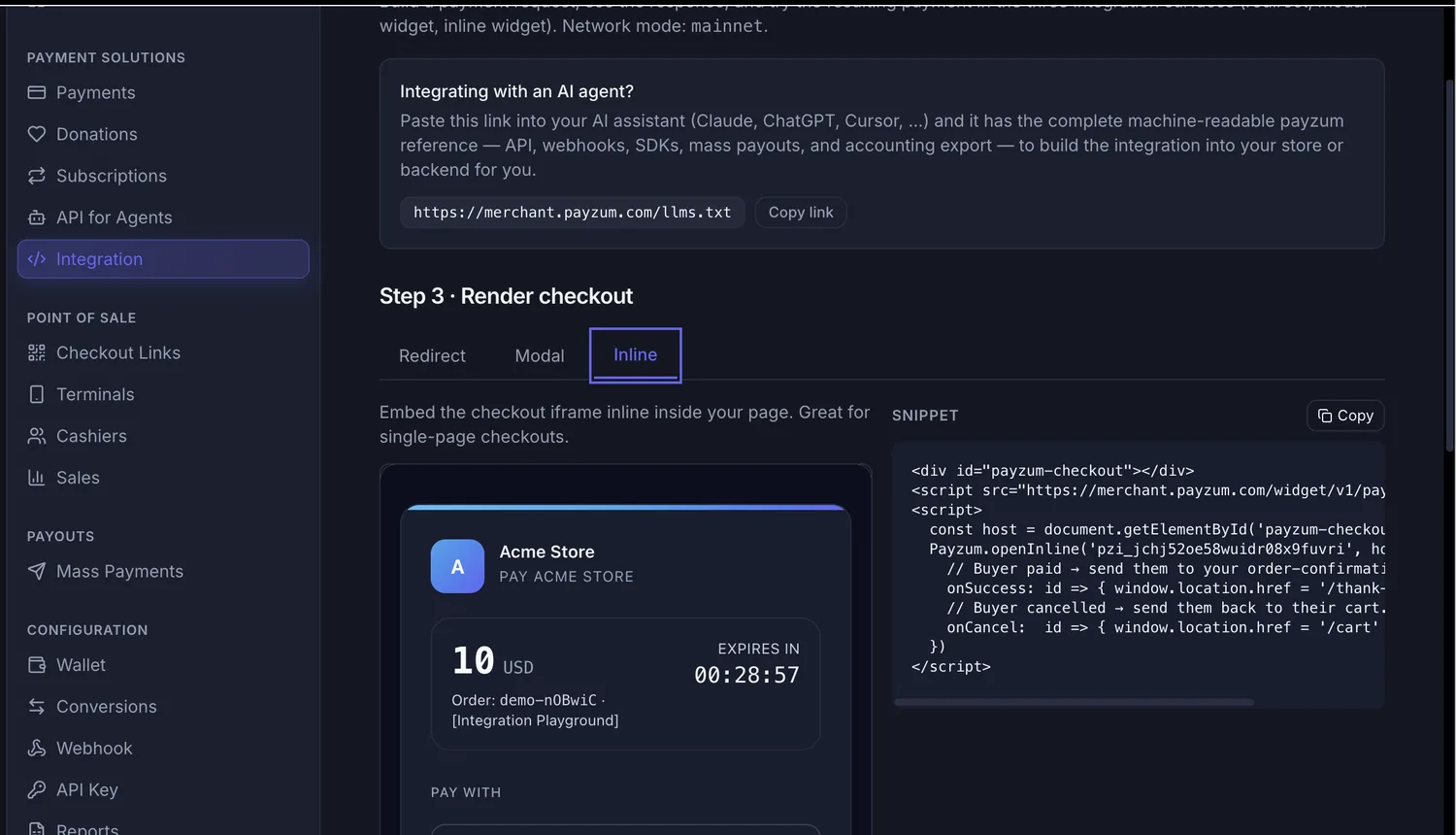
Mount the checkout inside a container you supply — no overlay, no auto-close, lifecycle yours. The natural fit for a single-page checkout.
The widget, in full
One script tag and one call. Load it with async and the global
Payzum object gives you open() for the modal,
openInline() for the embed and openLink() to create a fresh invoice
from a payment link.
The checkout, inside your own page
Amount, order reference, expiry countdown and the token selector all render inside your
container. Your CSP needs the Payzum host in script-src,
frame-src and connect-src — that is the only infrastructure note.
- Statuses relayed: pending, partial, paid, overpaid, expired, cancelled
- A staging widget host for sandbox work
-
rescan()picks up links added to the DOM later
Fulfil on the webhook, not on the callback
The widget's onSuccess fires when the checkout page posts a status message to your
page. It is perfect for moving the buyer to a thank-you screen. It is not what
should release a licence key or mark an order paid — a browser callback can be missed, replayed
or faked.
The signed IPN webhook delivered to your ipn_callback_url is the
authoritative source of truth. There is also an unauthenticated status endpoint —
GET /v1/invoices/{payment_id}/status, rate-limited per IP — when polling is
genuinely easier than receiving.
Retrying a create call? Send an Idempotency-Key header and a repeat request returns the original invoice instead of billing your buyer twice.
Want us to look at your stack before you build?
Tell us what your checkout runs on and we will map the shortest path — hosted redirect, widget, or waiting for the cart plugin that is already in review.
No commitment · We will tell you if the redirect flow is all you need
29 integrations, and counting
Twenty-nine platform integrations are written and running against the same API — eight of them installable straight from the package registries, the rest still moving through marketplace review but already public on GitHub. Every first-party plugin, every SDK and the OpenAPI contract they are generated from live in one place: github.com/payzum-dev. Nothing here is a closed binary you have to trust — read the code before you install it.
Available now
| Platform | Install | Repository |
|---|---|---|
| Sylius 2.x | composer require payzum/sylius-payzum-pluginOn the PaymentRequest flow |
sylius-payzum-plugin |
| Vendure | npm i @payzum/vendure-plugin-payzum |
vendure-plugin-payzum |
| Saleor | Payment app on the Transactions API — deploy from the repo | saleor-app-payment-payzum |
| pretix | pip install pretix-payzumTicketing and events |
pretix-payzum |
| Django (django-payments) | pip install django-payments-payzum |
django-payments-payzum |
| Frappe / ERPNext | Install the app from the repo with bench get-app |
frappe-payzum |
| Akaunting | Payments app — install from the repo | akaunting-payzum |
| Omnipay (any PHP cart on it) | composer require payzum/omnipay-payzum |
omnipay-payzum |
Built and rolling out
Twenty-one more integrations are written, tested against a running instance of each platform and waiting their turn in the marketplace queues — WordPress.org, PrestaShop Addons, the Magento and Shopify stores each have their own review cycle. The source is public today. Every name below links to its repository: clone it and install from source now, or ask us and we will send you the packaged build and walk the install with you.
E-commerce carts
- WooCommerceWordPress
- OpenCart3.x
- PrestaShop1.7 / 8
- Magento 22.4
- Shopware 6
- Zen Cart
- Ecwidhosted app
- Medusav2
- nopCommerce4.70
Hosted platforms
- Shopifyself-hosted app
- Wixself-hosted app
- BigCommerceself-hosted app
WordPress ecosystem
- Easy Digital Downloads
- GiveWPdonations
- Paid Memberships Promemberships
- Fluent Formsform payments
- Tutor LMScourse checkout
Billing & hosting
Want one of these before it hits the marketplace?
Tell us your platform and we will send you the plugin and walk the install with you. No waiting for a review queue.
Official SDKs
If you would rather not hand-roll the HTTP call and the webhook signature check, take an SDK. They are generated against one shared contract, so they do not drift apart.
| Language | Install | Repository |
|---|---|---|
| Python | pip install payzum | payzum-python |
| Node.js / TypeScript | npm i payzum | payzum-node |
| PHP | composer require payzum/payzum-php | payzum-php |
| Rust | cargo add payzum | payzum-rust |
| OpenAPI contract | The spec the SDKs are built from, plus shared webhook-signature test vectors | payzum-openapi |
Platform not listed? You are not blocked. Any cart that lets you call an HTTP endpoint and redirect the buyer can take crypto through the hosted checkout today — the plugins just remove the last few lines. Tell us which one you need and it goes on the list; that is how most of these started.
Let your AI assistant write the integration
The whole Payzum reference is published in a machine-readable file. Paste the link into Claude, ChatGPT or Cursor and the assistant has the API, webhooks, SDKs, mass payouts and accounting export — enough to build the integration against your own codebase.
It is the same reference our own docs are built from, so an agent working from it will not invent endpoints that do not exist.
The objections we hear most
"I don't want to maintain a crypto integration."
There is nothing chain-specific in your code. You send an amount and get a URL; adding a new network later is a setting on our side, not a deploy on yours.
"My cart doesn't have a plugin yet."
The hosted checkout needs an HTTP call and a redirect — that is within reach of every cart worth using. The plugins are a convenience, not a prerequisite.
"What about refunds and disputes?"
On-chain payments are final, so there are no chargebacks to defend. A refund is a transfer you choose to make from your own wallet, on your terms.
"Where does the money actually go?"
To addresses you control. Payzum is non-custodial for payments: settlement and payment are the same event, so there is no balance with us and no payout schedule to wait on.
Integration: frequently asked questions
How long does it take to integrate Payzum?
One server-side call and one line of front-end code. You POST to /v1/payment,
take invoice_url out of the response, and either redirect the buyer there or
mount the widget. There is no SDK to install for the redirect flow and no wallet
infrastructure to set up, because payments settle straight to addresses you control.
What is the difference between redirect, modal and inline checkout?
Redirect sends the buyer to the hosted checkout page — nothing to embed. Modal keeps them on your page and opens the checkout in a full-screen overlay that closes itself after a terminal status. Inline mounts the same checkout inside a container you supply, with no overlay and lifecycle you control. All three render the identical hosted checkout.
Do I have to pick the cryptocurrency for the buyer?
No. Send pay_currency as "all" and the checkout shows a searchable
currency selector grouped by chain, limited to the tokens you allow in Settings. If you
prefer to fix it, pass a specific currency — and a network when the symbol
exists on more than one chain.
How do I know a payment actually completed?
Fulfil on the signed IPN webhook sent to your ipn_callback_url. The widget
callbacks such as onSuccess are UI hints that fire when the checkout posts a
status to the parent page — useful for redirecting the buyer, not for releasing goods.
There is also an unauthenticated status endpoint for polling.
Is there a plugin for my shopping cart?
Very likely. Twenty-nine integrations are built: WooCommerce, PrestaShop, Magento 2, OpenCart, Zen Cart, Shopware 6, Shopify, Wix, BigCommerce, Ecwid, Medusa, nopCommerce, Easy Digital Downloads, GiveWP, Paid Memberships Pro, Fluent Forms, Tutor LMS, WHMCS, Blesta, HostBill and ClientExec, plus the eight you can already install from the package registries — Sylius, Vendure, Saleor, pretix, Django, Frappe/ERPNext, Akaunting and Omnipay. All of them, together with the SDKs for Python, Node, PHP and Rust, are open source at github.com/payzum-dev — install from source today, and the marketplace listings follow as each review clears. And any cart that lets you call an API can use the hosted checkout today.
Can an AI agent build the integration for me?
Yes. Paste https://merchant.payzum.com/llms.txt into Claude, ChatGPT or Cursor
and the assistant gets the complete machine-readable reference — API, webhooks, SDKs, mass
payouts and accounting export — so it can write the integration against your own stack.
Can I test before taking real money?
Yes. The dashboard has an integration playground where you build the request, inspect the real response and try the resulting payment in all three surfaces. There is also a staging widget host for sandbox work.
Start with the playground
Build a real request, see the real response, and try the payment in all three surfaces before you touch your codebase. If you would rather have a second pair of eyes on it, we are happy to look at your checkout with you.
Non-custodial · Crypto-only · Funds settle to wallets you control